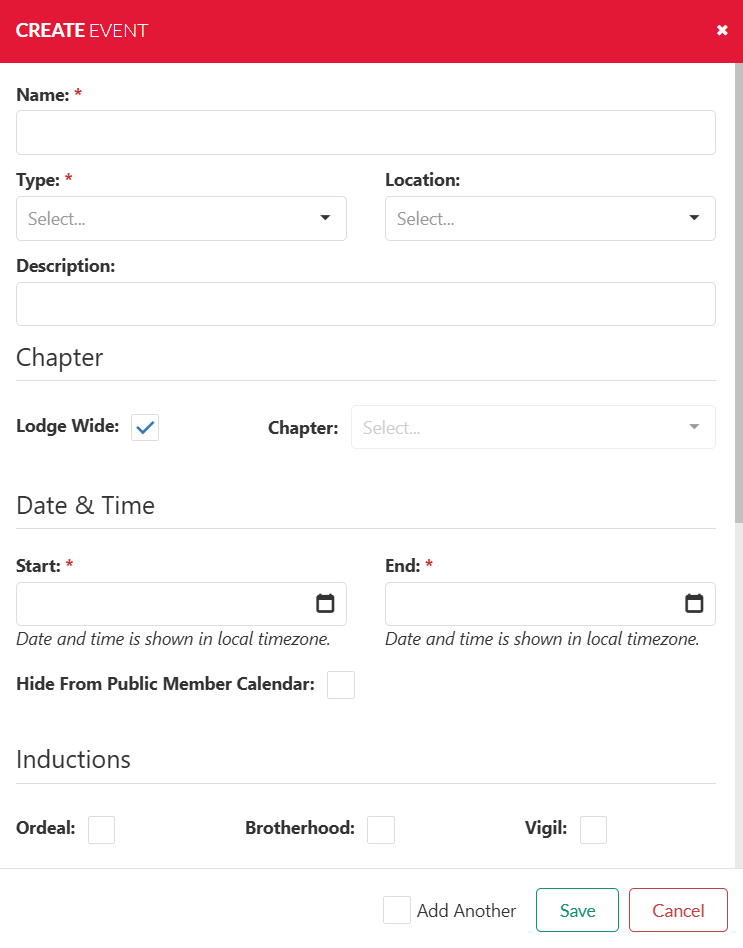
Complete the Event Information - Type in the Name of the event. **
- Select the Event Type from the pull down. **
- If you don't see the Event Type you need a new event type will have to be added first using the Settings > Events > Types Function.
- Select the Event Location from the pull down.
- If you don't see the Event Location you need a new event location will have to be added first using the Settings > Events > Location Function.
- Type in an Event Description.
- Indicate if it is a Lodge Wide event. NOTE: Use this for events that will count on your JTE numbers only.
- If a Chapter event only select the Chapter name from the pull down.
- Select the Event Start and indicate the start date/time. ** (see dialog example below)
- Select the Event End and indicate the end date/time. **
- Scroll Down to select any Options Inductions or Ceremonies Special Flags that may be at your event. (see example below)
- If you are going to add more events select the check box Add Another , or select the Save button.
** REQUIRED fields will be Event Name, Event Type, Event Start date/time and Event End date/time. |