...
- Before starting the process make sure to complete all lodge setup:
- Online Orders > Setup > Configuration - The following are required to be setup:
- Dues Payment Enabled
- Dues Payment Active Year
- Dues Payment Collection Start Date
- Dues Payment Collection End Date
- Online Orders > Setup > GL Accounts - Make sure to setup at least one account and make sure there is an account set for Dues, Events Default, Fee Donations, and optionally Annual Pass, plus one or more Event accounts.
- Online Orders > Setup > Configuration - The following are required to be setup:
- Create a support ticket and request online payment activation. Note: The request to enable online payments must come from a designated Lodge Administrator or the council Scout Executive.
- The OA LodgeMaster team will respond with setup details and some important notes.
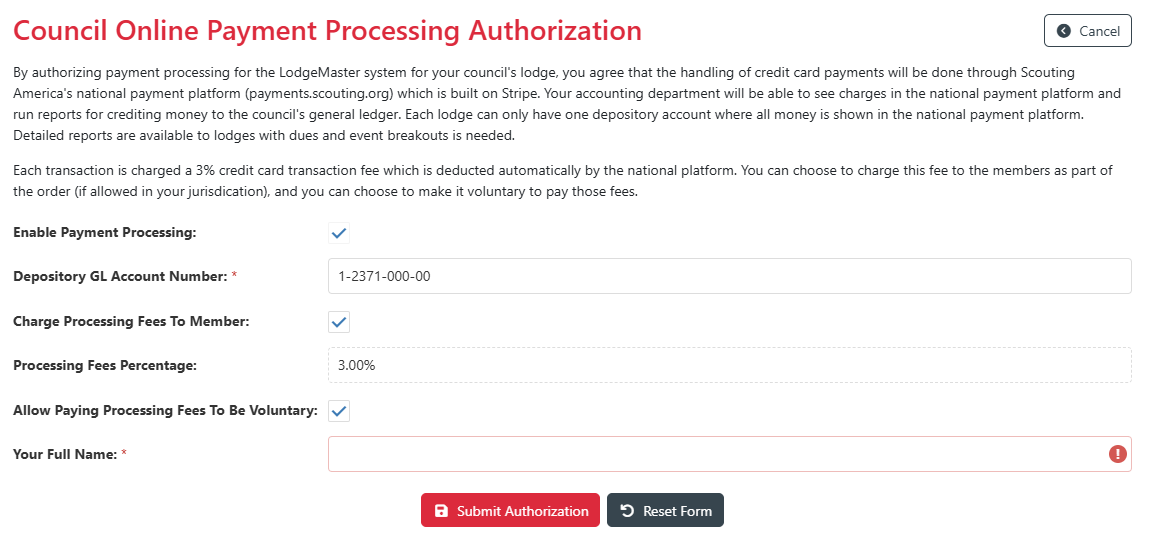 The OA LodgeMaster team will also send your Scout Executive an approval email - they or a designee must approve usage of the payment platform by your lodge.
- The Scout Executive (or a designated employee) clicks the approval link and approves use of the platform by the lodge. They must enter the following information.
- Depository GL Account Number - 1-xxxx-xxx-xx - The general ledger account number that will appear in the Scouting America payment record and help the council's finance department credit the income in the general ledger.
- Charge Processing Fees To Member - Yes/No - Should credit card processing fees be charged to the member or absorbed by lodge?
- Processing Fee Percentage - 3% - Not editable, set by Scouting America.
- Allow Paying Processing Fees To Be Voluntary - Yes/No - Should paying the credit card processing fees be voluntary?
- Once lodge setup is complete and the Scout Executive approval process is complete, payments will be active. Note it may take up to one hour for payments to be enabled in the member portal / member app.
...