| Table of Content Zone | |
|---|---|
|
...
Since you can also send app messages from the Event Manager, the app message compose window is covered at Sending App MessageMessages.
Send Portal Invites
Membership Audit
See Scouting America Membership Audit and SYT Verification Tool
Import
Import Members
See Import Members
...
Once you have the Scouting Member ID numbers filled in, use the Import Scouting Member IDs tool to upload the file back into LodgeMaster and update the member records.
Member Statuses
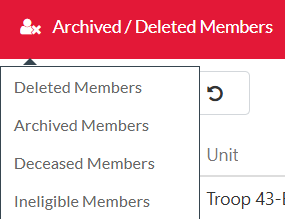
Deleted
- Not in searches or lists or stats.
Archived
- Elected candidates who did not complete their ordeal within 18 months can be moved to archived status. They will not be in the grid or searches but will stay in statistics.
...
- This is not for candidates; this is to remove a member from the system. This would be to remove a member who is no longer eligible for Scouting America, the Order of the Arrow, or someone who was asked to be removed by the Lodge Adviser or Scout Executive.
- This is NOT for candidates.
- Removed from searches, lists, and stats.
Non-Member
- This is to mark somebody who is a non-member for use for event attendees or unit contacts who aren’t members.
- Excluded from lists in members and searches, included in lists and searches in events. Excluded from stats.
Inactive
- Everyone here should be migrated to another list; this will be removed in a future release.
- Most people should be moved to an "Archived" status; a few may need to be moved to ineligible (the original only intention of the inactive flag).