Versions Compared

Key

  • This line was added.
  • This line was removed.
  • Formatting was changed.

...

Section
Column
width30%


Column
width70%


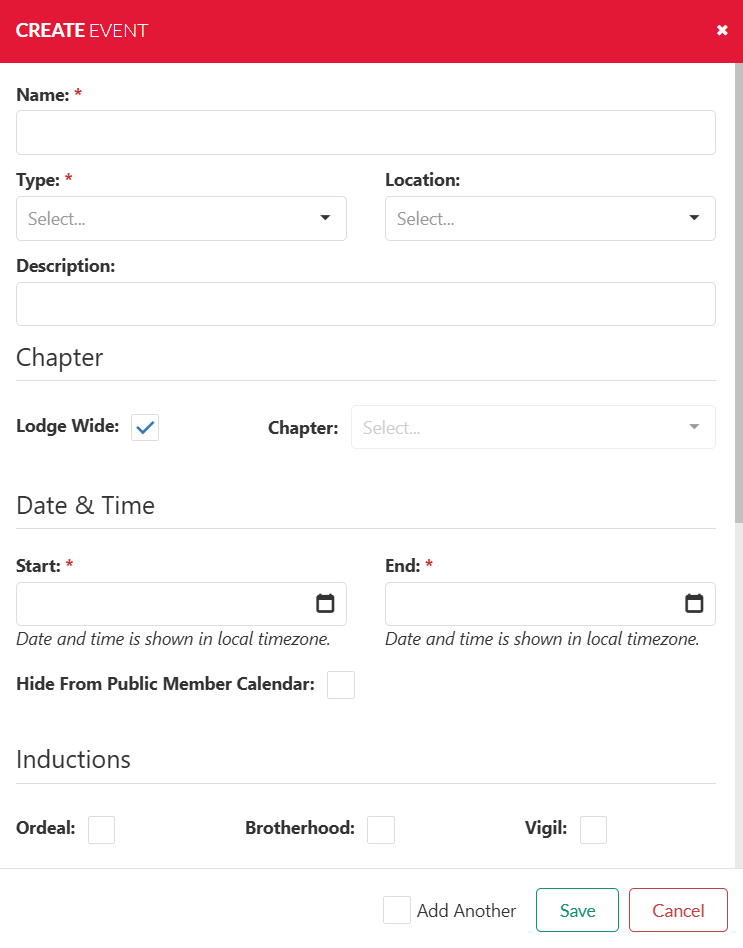
Complete the Event Information

  1. Type in the Name of the event. **
  2. Select the Event Type from the pull down. **
    1. If you don't see the Event Type you need a new event type will have to be added first using the Settings > Events > Types Function.
  3. Select the Event Location from the pull down.
    1. If you don't see the Event Location you need a new event location will have to be added first using the Settings > Events > Location Function.
  4. Type in an Event Description.
  5. Indicate if it is a Lodge Wide event. NOTE: Use this for events that will count on your JTE numbers only.
  6. If a Chapter event only select the Chapter name from the pull down.
  7. Select the Event Start and indicate the start date/time. ** (see dialog example below)
  8. Select the Event End and indicate the end date/time. **
  9. Scroll Down to select any Options Inductions or Ceremonies Special Flags that may be at your event. (see example below)
  10. If you are going to add more events select the check box Add Another , or select the Save button.

** REQUIRED fields will be Event Name, Event Type, Event Start date/time and Event End date/time.


...

Section

Edit Event Information

Column
width50%

From the Events screen select "Edit"

Once selected you can edit the following information for the event:

  1.  Name of the Event **
  2.  Event Type **
    1. If you don't see the Event Type you need a new event type will have to be added first using the Settings > Events > Types Function.
  3. Event Location
    1. If you don't see the Event Location you need a new event location will have to be added first using the Settings > Events > Location Function.
  4. Event Description
  5. Chapter
    1. Either Lodge Wide or specific Chapter event
  6. Start & End Date / Time ** (See Dialog Example Above)
  7. Visibility to Public Member Calendar
  8. Indication type is any
    1. Ordeal
    2. Brotherhood
    3. Vigil
  9. Special Flags
    1. Callout Ceremony
    2. Lodge LLD
  10. Registration Link
    1. Candidates
    2. Members
    3. Brotherhood
    4. General More Info

** REQUIRED fields will be Event Name, Event Type, Event Start date/time and Event End date/time.


Column
width50%


...