-
Created by
 Shawn Knight, last updated on Mar 25, 2026
2 minute read
Shawn Knight, last updated on Mar 25, 2026
2 minute read
As part of the Order of the Arrow's rollout of the new Induction process, all lodges are required to document key components and milestones of the process, as outlined below, in OA LodgeMaster (OALM). The information at each step that will be required is:
- Step 1 - See One: See On requires the lodges core team of induction facilitators (ceremonialist, luminaries, advisors/relevant support staff) to first go through the new induction. Documentation for Step 1: See One requires:
- The name of the individual.
- The role they are aligned to play (ceremonials, luminary, or relevant adviser / support staff).
- The Induction Experience (National, Section, or Lodge) they attended.
- Step 2 - Do One: Do one requires the lodge facilitate an induction experience, using their core team trained in Step 1, for existing members of the Order of the Arrow. In most cases, this is their own lodge through a Lodge Induction Experience (LIE). Select Exemplar Lodges will complete their step two requirements by facilitating a Section Induction Experience (SIE).
- This step is logged using the Events tool in OALM.
- Step 3 - Offer One: The final step of the process is to then offer the first new induction for new members of the order of the arrow. This would be the first batch of newly elected members who experience the induction to accept membership into the Order of the Arrow rather than the Ordeal weekend currently in place.
- This step is completed using the Events tool in OALM.
Below is a detailed walk through of the technology enhancements available in OALM as of April 1, 2026 to support the Induction Rollout process.
Pre-Requisites
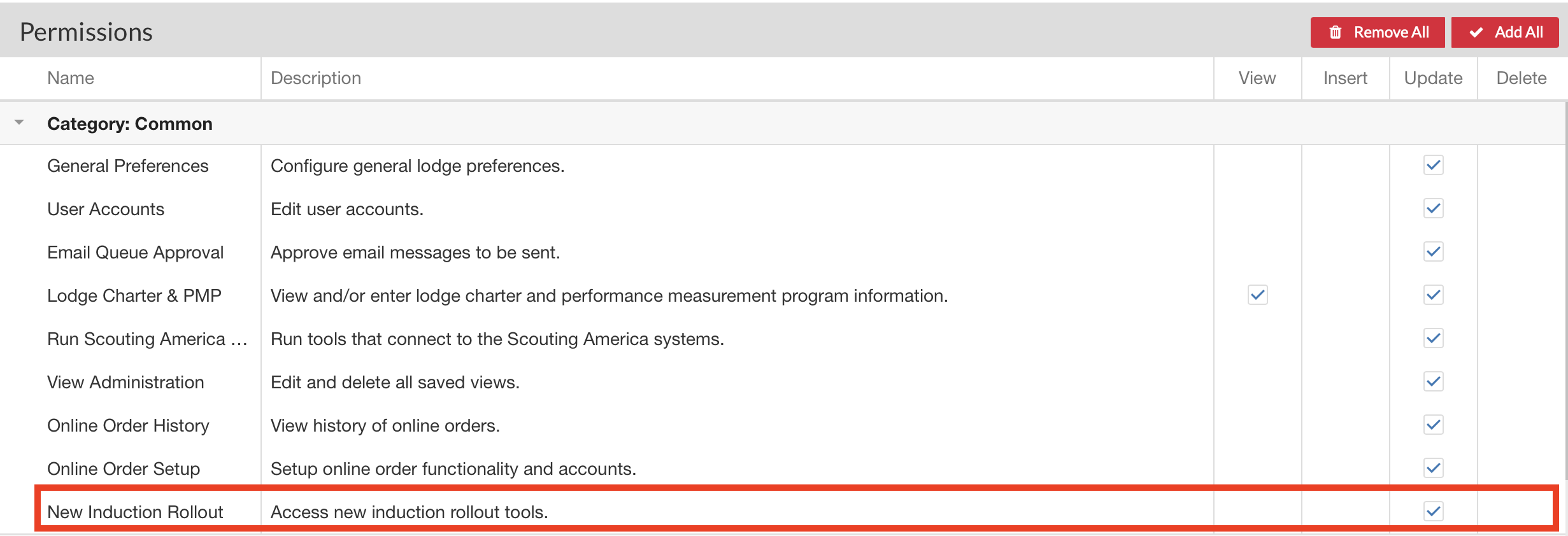
In order to access these tools, an additional permission has been created. Any LodgeMaster user who needs to view and/or edit the Induction Rollout will need the New Induction Rollout permission under the Category: Common menu below. Any user with the permission to manage user accounts may grant / revoke this permission at any time under the Users module. A screenshot below indicates where the new permission is located.
Navigating to the New Induction Rollout Manager (NIRM)
The NIRM may be accessed by:
- Navigating to the Members module.
- Under the Tools drop down menu at the top of the screen, select New Inductions.
Below is a screenshot of the NIRM and details on each section.